Ux Data Format
Signaloid UxHw® technology uses digital representations of continuous probability distributions to perform distribution arithmetic in computation. Applications can export marginal-distribution information as strings in the Signaloid Ux Data format. Essentially, the Ux Data format is a serialization of the distribution inside UxHw.
Ux Data has two variants:
- the Ux Binary format for storing and loading distributions using binary blobs, files, and packets, and
- the Ux String format for communication using ASCII or UTF-8 messages.
Single-precision and double-precision representations
The underlying data type of a distribution is either single-precision or
double-precision floating-point. The precision is pre-set for each Signaloid
core. The types you declare in your source code do not affect the underlying
distribution data type, so a distribution associated with a float variable and
one associated with a double variable are of the same underlying data type on
the same core.
The precision affects the size of the serialized Ux Data. For both Ux Binary and Ux String, the support position of each Dirac delta is the only field whose width changes. Every other field has constant width.
Precision presets
C0Pro-class cores use a double-precision underlying data type. Cores targeting the C0-microSD and C0-microSD+ compute modules use a single-precision underlying data type.
| Core class | Preset underlying data type | Bit width |
|---|---|---|
| C0Pro | double precision | 64 |
| C0-microSD | single precision | 32 |
| C0-microSD+ | single precision | 32 |
You cannot change the underlying data type of a selected core. If your application requirements necessitate different precision–class configuration, please contact Signaloid support.
Ux Binary format
Ux Binary data is little-endian. The layout is the following.
| Field | Size | Type |
|---|---|---|
| Particle value | 8 bytes | double |
| Format marker | 3 bytes | The literal bytes 0xF0 0x00 0x00 |
| Representation type | 1 byte | uint8 |
| Number of samples | 8 bytes | uint64 |
| Mean value of the distribution | 8 bytes | double |
| Number of non-zero mass Dirac deltas | 4 bytes | uint32 |
| Support position and probability mass, one pair per Dirac delta | 4 or 8 bytes, then 8 bytes | float or double, then uint64 |
The support position is the only field whose width depends on the underlying data type. It is 4 bytes when the data type is single-precision and 8 bytes when it is double-precision. Every other field keeps the width above in both cases.
The probability mass is a fixed-point value rather than a floating-point one. The value 0x8000000000000000 represents
a probability of 1.0, so you recover the probability by dividing the stored value by 0x8000000000000000.
Ux String format
The following table describes the layout of a Ux String.
| Field | Size | Encoding |
|---|---|---|
| Particle value | variable | Printed floating-point value |
Separator (Ux) | 2 characters | ASCII characters Ux |
| Representation type | 2 characters | Hexadecimal in ASCII |
| Number of samples | 16 characters | Hexadecimal in ASCII |
| Mean value of the distribution | 16 characters | Hexadecimal in ASCII |
| Number of non-zero mass Dirac deltas | 8 characters | Hexadecimal in ASCII |
| Support position and probability mass, one pair per Dirac delta | 8 or 16 characters, then 16 characters | Hexadecimal in ASCII |
The particle value has variable width depending on the number of digits. The support position is 8 ASCII characters for single-precision floating point and 16 ASCII characters for double-precision. Every other field has constant width.
The hexadecimal fields of a Ux String are big-endian. The probability mass uses
the same fixed-point encoding as Ux Binary, with 8000000000000000 representing
a probability of 1.0.
Example of storing a Ux String
The following simple code example shows the distribution of a variable value whose samples
are stored in the samples array. The simple example runs on the Signaloid C0 processor and uses the capabilities
exposed above the ISA to inject distribution information into the processor, i.e., using UxHwDoubleDistFromSamples.
The example assumes that you have mounted your Signaloid Cloud Storage at sd0. You can read the reference of the Code
Editor for detailed steps on how to mount your Signaloid Cloud
Storage. The example opens the uxString.txt file and
stores the distributional information of value encoded as a Ux String. Figure 1 shows the visualization of the
distribution of the variable value. The Ux String and binary digits that follow below show the representation of that
distribution as hexadecimal and binary formatted distribution information in Signaloid's Ux data format. Figure
2 shows the contents of the uxString.txt file as they appear in the Signaloid Cloud Data Storage in the Data and
Sensors page.
#include <stdio.h>
#include <uxhw.h>

int
main(void)
{
  FILE *	fp;
  double	value, samples[] = {90, 120, 96, 20, 99, 102, 112, 68, 90, 109};

  value = UxHwDoubleDistFromSamples(samples, sizeof(samples)/sizeof(double));

  fp = fopen("sd0/uxString.txt", "w+");
  fprintf(fp, "value = %lf\n", value);
  printf("value = %lf\n", value);

  return 0;
}
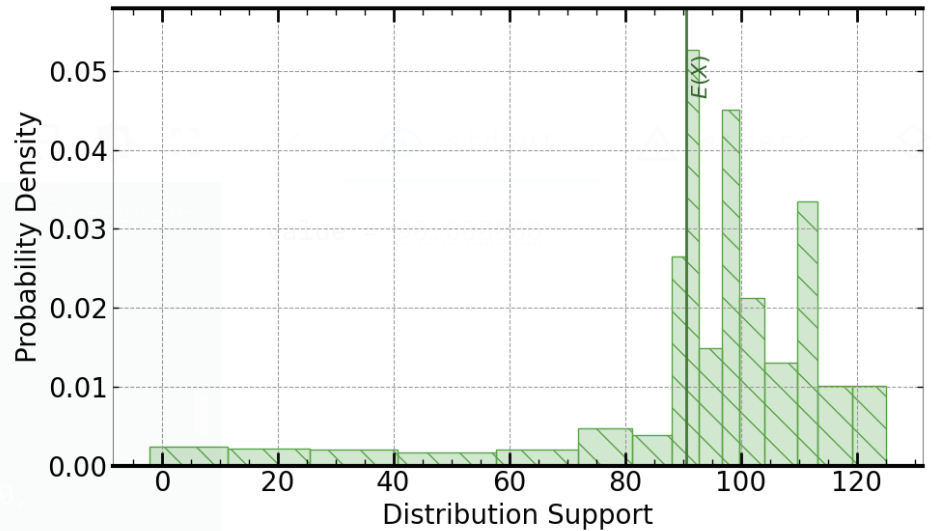
value whose samples are stored in the samples array. The simple code example runs on the Signaloid C0 processor and uses the UxHwDoubleDistFromSamples to initialize the distribution of the variable value.Ux String representing the distribution of the variable value (including particle value prefix):
90.600000Ux04000000000000000A4056A666666666670000000A40568000000000000CCCCCCCCCCCCCCD405E0000000000000CCCCCCCCCCCCCCD40580000000000000CCCCCCCCCCCCCCD40340000000000000CCCCCCCCCCCCCCD4058C000000000000CCCCCCCCCCCCCCD40598000000000000CCCCCCCCCCCCCCD405C0000000000000CCCCCCCCCCCCCCD40510000000000000CCCCCCCCCCCCCCD40568000000000000CCCCCCCCCCCCCCC405B4000000000000CCCCCCCCCCCCCCC
Ux Binary representing the distribution of the variable "value" (excluding particle value prefix and "Ux"):
00000100000000000000000000000000000000000000000000000000000000000000101001000000010101101010011001100110011001100110011001100110011001110000000000000000000000000000101001000000010101101000000000000000000000000000000000000000000000000000110011001100110011001100110011001100110011001100110011001101010000000101111000000000000000000000000000000000000000000000000000001100110011001100110011001100110011001100110011001100110011010100000001011000000000000000000000000000000000000000000000000000000011001100110011001100110011001100110011001100110011001100110101000000001101000000000000000000000000000000000000000000000000000000110011001100110011001100110011001100110011001100110011001101010000000101100011000000000000000000000000000000000000000000000000001100110011001100110011001100110011001100110011001100110011010100000001011001100000000000000000000000000000000000000000000000000011001100110011001100110011001100110011001100110011001100110101000000010111000000000000000000000000000000000000000000000000000000110011001100110011001100110011001100110011001100110011001101010000000101000100000000000000000000000000000000000000000000000000001100110011001100110011001100110011001100110011001100110011010100000001010110100000000000000000000000000000000000000000000000000011001100110011001100110011001100110011001100110011001100110001000000010110110100000000000000000000000000000000000000000000000000110011001100110011001100110011001100110011001100110011001100

value encoded as a Ux String in the file uxString.txt in the Signaloid Cloud Data Storage. You can see the contents of the uxString.txt file as they appear in the Signaloid Cloud Data Storage in the Data and Sensors page.Suppressing Ux String printing
In UxHw applications, calls I/O operations of the C and C++ standard libraries to print floating-point values also print the Ux String of the distribution associated with the passed floating-point values. To suppress printing of the Ux String and just print the particle value of the passed floating-point values, use the %P modifier or the corresponding macro SignaloidParticleModifier. The following code snippet shows example usage using fprintf.
#include <stdio.h>
#include <uxhw.h>

int
main(void)
{
  double	value = UxHwDoubleUniformDist(0.1, 1.0);

  fprintf(stdout, "value = %lf\n", value);

  fprintf(stdout, "value = %Plf\n", value);

  /*
   *	The `SignaloidParticleModifier` macro has
   *	the same effect.
   */
  fprintf(stdout, "value = %" SignaloidParticleModifier "lf\n", value);

  return 0;
}
For convenience, the macro SignaloidParticleModifier can be set to "" for non-UxHw builds.
Example of ingesting a Ux String
The simple program shown below reads in the Ux String using the standard C library call sscanf, and by doing so, injects distribution
information encoded as a Ux String into the variable value when executed on the Signaloid C0 processor.
#include <stdio.h>

int
main(void)
{
  double value;

  sscanf("90.600000Ux04000000000000000A4056A666666666670000000A40568000000000000CCCCCCCCCCCCCCD405E0000000000000CCCCCCCCCCCCCCD40580000000000000CCCCCCCCCCCCCCD40340000000000000CCCCCCCCCCCCCCD4058C000000000000CCCCCCCCCCCCCCD40598000000000000CCCCCCCCCCCCCCD405C0000000000000CCCCCCCCCCCCCCD40510000000000000CCCCCCCCCCCCCCD40568000000000000CCCCCCCCCCCCCCC405B4000000000000CCCCCCCCCCCCCCC", "%lf", &value);

  printf("value = %lf\n", value);

  return 0;
}